


2024 Data Driven WIFI || Automation and APIs
Introduction
When it comes to WIFI 6 deployments, like all the other lower frequency deployments you will need to start with a proper wireless survey and accurately capture the customer requirements in order to fulfil them from bottom up in your design. This is the foundation of all WIFI design and if this is done wrongly then you will be building on a faulty foundation and no matter how much data you pull from your network if the foundation is faulty, you can’t use much of that data.
In this blog we explore some of the upper layers of WIFI deployment. I thought of focusing specifically on Data analytics and its usage within WIFI6 deployments. Many vendors across the world have gone on the route of programmability, assurance and SDNs in WIFI deployments and these includes Ruckus, Huawei, Aruba and Cisco. In many deployments we have done at Betta technologies we realized that most customers are still a bit stuck in the old era thinking and are not capitalizing on what these newer technologies coming now in SDN era have to offer. One of the little used capabilities that comes specifically with C9800, and DNA is model driven telemetry and automation. This ability specifically hangs on data, machine learning and artificial intelligence. This is made possible because of Data. In this discussion we will focus on cisco wireless products because its currently one of the leaders in this category as indicated by Gartner quadrant.
Just to understand the environment we will be referencing below is the list of equipment considered in this discussion
- C9800-40
- DN2-HW-APL
- C9136
- C9300 PoE access switches
- C9500 Core switches
- Linux box(python)
As indicated above today we will focus on Wireless Data driven results making use of Cisco DNAC assurance and programmability capability. This will mainly be divided into 2 brief sessions.
- Network driven telemetry
- Programmability with APIs
Getting the right data at the right time with the right context enables Cisco DNA Center Assurance to provide actionable insights on WIFI. Most of customers don’t maximize of these tools and capability especially as they refresh from 2.4 GHz and 5 GHz to 6GHz.
Why is Data Driven Wireless Network important.
It allows network administrator to move from a reactive troubleshooting to proactive monitoring and troubleshooting. This makes network team to beat the user in knowing if they is an issue on the wireless network and resolve it before users starts complaining, which will improve users experience. This data can also be used the next time a company wants to refresh its wireless infrastructure like WIFI-6E or the looming WIFI7.
Integration of DNAC with C9800
In this discussion I used C9800-40 Deployed in High Availability and 2 nd Generation DNAC hardware in standalone mode (no cluster). To give a bit of picture in the design I have put together below diagram for normal high availability deployments with a core switch stack.
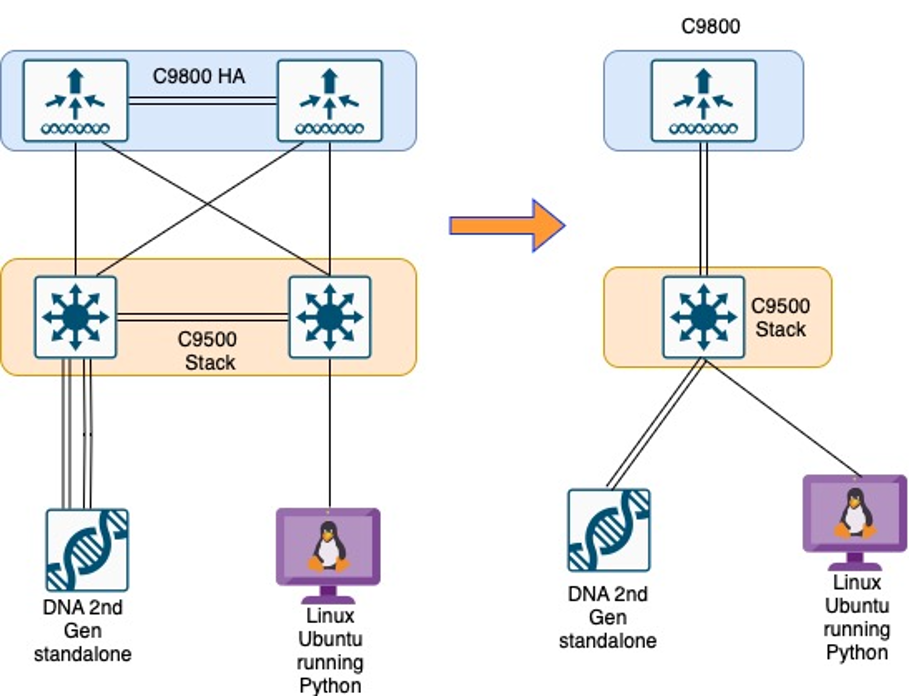
After all (ip address, switching, routing) above has been set up and Aps joined the C9800, you will need to do the following from a high level for Network Driven Telemetry.
C9800
- Enable netconf on C9800 (including port 830)
- Configure AAA default settings for Netconf to authenticate.
- Point SNMP host, dhcp secondary and logging to dnac
- Make sure all DNAC certs are onboarded. (They will get pushed from DNA during onboarding)
DNA (Assumption is that all, Design, network settings, maps, credentials for ssh,http are already setup)
- Discover and add new C9800 to DNAC
- Enable telemetry.
- Enable AI for all groups.
- Enable machine reasoning.
- Enable device control.
- Integration with your wireless authentication servers (ISE, AD)
Below are a couple of commands you might need to push into your C9800 to enable MDT.
aaa new-model
aaa authentication login default local
aaa authorization exec default local
username netconfuser privilege 15 secret netconfpass
netconf-yang
restconf
ip http secure-server
Network Driven Telemetry
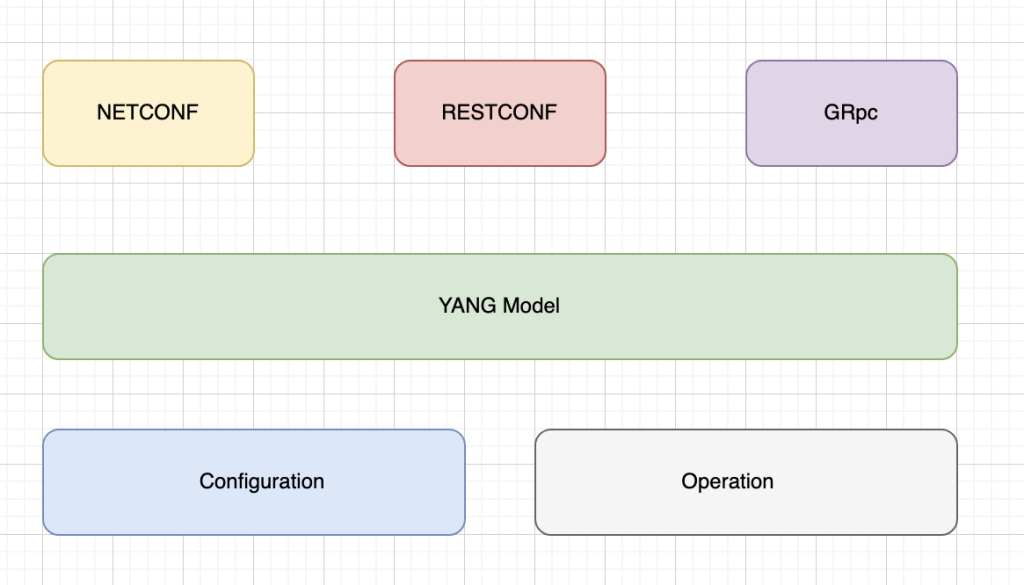
Model-driven telemetry (MDT) uses YANG to model the data and standard protocols like NETCONF, RESTCONF, or gRPC to send it over the network. This enables operational and configuration data. Diagram below give a summary picture of how these protocols interact with each another.
Now that we have handled the brief foundation on data on C9800 platform its time to check some of the examples on how we usually capitalize on this data and use python to interact with APIs on DNAC to pull that data. Below is the scenario which one of our customers requested, the customer has 4 000 users’ enterprise network.
We would want to receive an email when a specific percentage of health has been bridged within WIFI health statistics.
Using python scripts, we were able to get WIFI stats and pushed them over email to operations team successfully which fulfilled the customer request. In the next blog I will detail how we arrived to the solution and share the python scripts lower version we used.
Munya
Senior Engineer : Betatechnologies

Oswell Muzanenhamo
January 5, 2024This is an interesting piece Munya, I am sure we will learn a lot more here.Please keep them coming!Will refer other enthusiastic IT professionals here
Lucian
January 12, 2024Spot on Munya,data-driven wireless network is the way to go as it allows proactive adjustment and improves the user experience.Looking forward to the next post